Yep, we may get a tiny thank-you (read: commission) when you buy through
links on Techspotr — not enough for a yacht, but enough to keep the lights (and
servers) on.
Learn more
84
Highlights
66
Differences
7
Reactions
0
Likes
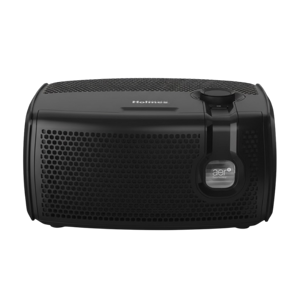
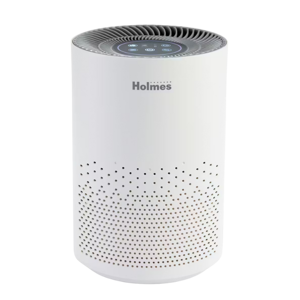
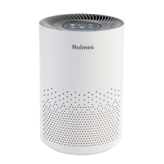
Holmes aer1 Desktop
vs
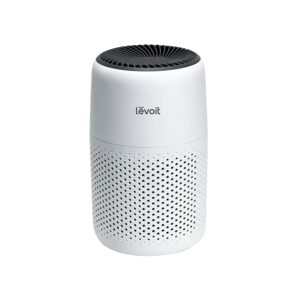
Levoit Core Mini:
84 Highlights & 66 Differences —
So, Which Air Purifier Actually Works Better
We break down features, usability, and filters. Find out which model suits your room style and clean air demands.
Still unsure between Holmes aer1 Desktop and Levoit Core Mini? We compared their auto dimming display, automatic mode, auto fan speed adjustment & safety auto shutoff and features so you can confidently pick the better air purifier.
Levoit Core Mini vs Holmes aer1 Desktop: A Detailed Desktop Air Purifier Comparison
When it comes to desktop air purifiers, the Levoit Core Mini and Holmes aer1 Desktop are two popular contenders, both aiming to improve indoor air quality in bedrooms, offices, and living spaces. Each model boasts a three-stage HEPA filtration system designed to capture dust, pollen, smoke, and odors. However, they diverge in key aspects like room coverage, filtration efficiency, power consumption, and advanced features. The Levoit Core Mini shines in compactness, quieter operation, and superior filter grade. At the same time, the Holmes aer1 Desktop distinguishes itself with a higher Clean Air Delivery Rate (CADR), a vivid LED air quality display, and extra user-friendly controls. Let's unpack these differences to find out which model better suits your needs.
Why Levoit Core Mini Excels in Compact Efficiency
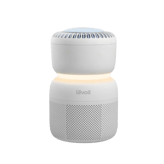
The Levoit Core Mini prides itself on fitting robust air purification into a small, sleek package weighing just 2.2 pounds with a neat 6.5-inch cube footprint. It covers a larger recommended room size of up to 255 square feet, making it suitable for bedrooms, nurseries, or small living areas.
What truly stands out is its 3-stage filtration system featuring an H13 grade HEPA filter that captures 99.97% of airborne particles, providing a higher filtration efficiency compared to Holmes's H10 filter. The activated carbon filter further enhances odor elimination, using premium materials like fiberglass and carbon fiber, contributing to better air purification. Also notable is the extended filter life of six months, which cuts down replacement frequency and cost.
In addition to effective filtration, the Levoit Core Mini prides itself on remarkably low noise levels, starting at just 25 dB at minimum speed, making it a quiet companion for light sleepers. The power consumption is only 7 watts, demonstrating excellent energy efficiency; ideal for those who want continuous operation without a spike in electricity bills.
Operating controls are intuitive via touch-sensitive panels on the top. However, it lacks a remote control and has no display, which keeps things simple but restricts real-time air quality feedback or automation modes. Still, it supports sleep mode for nighttime use and a filter replacement indicator to assist with upkeep.
Holmes aer1 Desktop: Feature-Rich Air Purification with Superior CADR
In contrast, the Holmes aer1 Desktop offers a smaller recommended coverage area of 109 square feet, but compensates with a notably higher Clean Air Delivery Rate (CADR) of 70, compared to 46 for Levoit. This means the Holmes unit can purify the air more rapidly within its effective zone, which is essential for quick freshness in smaller rooms.
Filtration is based on an H10-grade HEPA filter with 99% efficiency, coupled with a foam pre-filter and activated carbon to trap larger particles and neutralize odors. The Holmes model also uniquely incorporates an ionizer function to enhance particle capture efficiency, a feature absent in the Levoit Core Mini.
The Holmes purifier impresses with its extensive suite of controls and safety features. It sports a bright LED display showing real-time air quality, an automatic mode that adjusts fan speed on the fly, plus timer and child lock functions, offering more customization and safety. There's also a remote control for convenient operation from afar and user-friendly error indicators.
Although larger and heavier at 5.5 pounds with glossy ABS plastic housing, the Holmes audiophile-grade purifier flaunts a versatile upward airflow and multiple fan modes, including eco, turbo, and sleep. Maintenance is straightforward too, thanks to tool-free filter replacement from front access and cleaning tools included, with a recommended cleaning frequency of 60 days.
Safety-wise, Holmes matches well with overheat and tipover protections and zero ozone emissions, meeting all major certifications like AHAM, CARB, and Energy Star, along with a generous 3-year warranty supported by nationwide service centers.
Quick Overview
The Levoit Core Mini offers an impressively quiet and energy-saving purification experience with a premium H13 HEPA filter and extended filter lifespan, ideal for larger rooms requiring continuous, hassle-free filtration. Conversely, the Holmes aer1 Desktop powers through smaller rooms with a higher CADR, providing real-time air quality monitoring, automatic fan control, and safety locks for enhanced convenience and performance.
Bottom Line
For buyers seeking a feature-packed desktop purifier that guarantees faster air turnover and smart control options, the Holmes aer1 Desktop is the standout choice. Its higher CADR, ionizer, and comprehensive display technology make it perfect for users who value detailed air quality feedback and versatile operation in smaller spaces.
On the flip side, if you prioritize compact design, quiet operation, substantial coverage, and superior filtration efficacy with lower energy consumption, the Levoit Core Mini fits the bill beautifully. It is a no-frills purifier that excels in simplicity and efficiency, at an attractive price point starting around $41.99 at Levoit.com.
Verdict
Winner: Holmes aer1 Desktop - Offers superior CADR for faster air cleaning, detailed air quality monitoring, multiple fan modes, and a longer warranty, making it the better all-around performer.
Runner-up: Levoit Core Mini - Best for those needing quiet, energy-efficient purification with excellent HEPA filtration and an extended filter life, perfect for larger rooms but without advanced features.
Side by side. The numbers. The features. No drama.
Can’t decide between Holmes aer1 Desktop and Levoit Core Mini? This in-depth air purifiers breakdown highlights what makes each product unique — from standout features and hidden quirks to pricing, performance, and what actual users are saying.
The Levoit Core Mini is recommended for larger rooms up to 255 sq ft, significantly more than the Holmes aer1 Desktop's 109 sq ft, making the Levoit more suitable for bigger spaces.
The ideal room area for optimal purification performance.
In the battle of Recommended Room Size,
Holmes aer1 Desktop ◉ is
worse than
Levoit Core Mini ◉
, delivering
lower
146.0 sq ft
measurement.
Based on community votes for Recommended Room Size,
Holmes aer1 Desktop ◉ earned
0 votes,
less than
Levoit Core Mini ◉,
which got 1 votes.
The Levoit Core Mini really wins on recommended room coverage, 255 sq ft is pretty good for a compact unit. Holmes only handles 109 sq ft, which is significantly smaller.
The Holmes aer1 Desktop is named 'Holmes aer1 Desktop' while the Levoit Core Mini is named 'Levoit Core Mini', indicating their specific product identities.
The official name or model identifier of the air purifier.
In the battle of Model Name,
Holmes aer1 Desktop ◉ is
worse than
Levoit Core Mini ◉
, delivering
lower
8 score
measurement.
Don’t keep it to yourself — be the first to react and review the
Model Name on Holmes aer1 Desktop ◉
vs Levoit Core Mini ◉ and help others decide!
40
Holmes aer1 Desktop
0Votes
Bedroom, Living Room, Office
44
Levoit Core Mini
0Votes
Bedroom, Living Room, Office, Nursery
vs
Intended Room Type
The Holmes aer1 Desktop is intended for Bedroom, Living Room, and Office environments, whereas the Levoit Core Mini is also suitable for a Nursery, offering slightly broader application.
Specifies what kind of room the air purifier is designed for.
In the battle of Intended Room Type,
Holmes aer1 Desktop ◉ is
worse than
Levoit Core Mini ◉
, delivering
lower
4 score
measurement.
Don’t keep it to yourself — be the first to react and review the
Intended Room Type on Holmes aer1 Desktop ◉
vs Levoit Core Mini ◉ and help others decide!
The Holmes aer1 Desktop utilizes HEPA technology, while the Levoit Core Mini incorporates both HEPA and Activated Carbon, suggesting a broader range of filtration capabilities for the Levoit.
The primary purification technologies used by the unit.
In the battle of Technology Type,
Holmes aer1 Desktop ◉ is
better than
Levoit Core Mini ◉
, delivering
higher
1 score
measurement.
Don’t keep it to yourself — be the first to react and review the
Technology Type on Holmes aer1 Desktop ◉
vs Levoit Core Mini ◉ and help others decide!
The Holmes aer1 Desktop is available in Black, whereas the Levoit Core Mini offers more color options including White, Green, and Black for more aesthetic choice.
Available color variations for this model.
In the battle of Color Options,
Holmes aer1 Desktop ◉ is
worse than
Levoit Core Mini ◉
, delivering
lower
11 score
measurement.
Don’t keep it to yourself — be the first to react and review the
Color Options on Holmes aer1 Desktop ◉
vs Levoit Core Mini ◉ and help others decide!
The Holmes aer1 Desktop features a Desktop form factor, contrasting with the Levoit Core Mini's Compact form factor, indicating the Levoit is likely smaller and more portable.
The overall shape and layout of the device.
In the battle of Form Factor,
Holmes aer1 Desktop ◉ is
worse than
Levoit Core Mini ◉
, delivering
lower
16 score
measurement.
Don’t keep it to yourself — be the first to react and review the
Form Factor on Holmes aer1 Desktop ◉
vs Levoit Core Mini ◉ and help others decide!
The Holmes aer1 Desktop includes an LED display, a feature not present on the Levoit Core Mini, which has no display type.
The kind of display interface provided.
In the battle of Display Type,
Holmes aer1 Desktop ◉ is
better than
Levoit Core Mini ◉
, delivering
higher
65 score
measurement.
Don’t keep it to yourself — be the first to react and review the
Display Type on Holmes aer1 Desktop ◉
vs Levoit Core Mini ◉ and help others decide!
Model Type
What type of model is this?
35
Holmes aer1 Desktop
0Votes
Desktop
36
Levoit Core Mini
0Votes
Desktop
The structural style or type of the air purifier.
In the battle of Model Type,
Holmes aer1 Desktop ◉ is
worse than
Levoit Core Mini ◉
, delivering
lower
1 score
measurement.
Don’t keep it to yourself — be the first to react and review the
Model Type on Holmes aer1 Desktop ◉
vs Levoit Core Mini ◉ and help others decide!
Product Series
What is the product series?
76
Holmes aer1 Desktop
0Votes
aer1
65
Levoit Core Mini
0Votes
Core
Indicates which product line or series the model belongs to.
In the battle of Product Series,
Holmes aer1 Desktop ◉ is
better than
Levoit Core Mini ◉
, delivering
higher
11 score
measurement.
Don’t keep it to yourself — be the first to react and review the
Product Series on Holmes aer1 Desktop ◉
vs Levoit Core Mini ◉ and help others decide!
Country Of Origin
What is the country of origin?
55
Holmes aer1 Desktop
0Votes
CN
56
Levoit Core Mini
0Votes
CN
The country where the product was manufactured.
In the battle of Country Of Origin,
Holmes aer1 Desktop ◉ is
worse than
Levoit Core Mini ◉
, delivering
lower
1 score
measurement.
Don’t keep it to yourself — be the first to react and review the
Country Of Origin on Holmes aer1 Desktop ◉
vs Levoit Core Mini ◉ and help others decide!
The Levoit Core Mini is significantly lighter at 2.2 lbs (1 kg), making it much more portable than the Holmes aer1 Desktop, which weighs 5.5 lbs (2.5 kg).
The total weight of the air purifier unit.
In the battle of Weight,
Holmes aer1 Desktop ◉ is
worse than
Levoit Core Mini ◉
, delivering
higher
3.3 lbs
measurement.
Based on community votes for Weight,
Holmes aer1 Desktop ◉ earned
0 votes,
less than
Levoit Core Mini ◉,
which got 1 votes.
The Holmes aer1 Desktop is considerably deeper at 14.2 inches (36.1 cm), compared to the Levoit Core Mini's 6.5 inches (16.5 cm) depth, meaning the Levoit takes up less surface space.
The front-to-back measurement of the purifier.
In the battle of Depth,
Holmes aer1 Desktop ◉ is
worse than
Levoit Core Mini ◉
, delivering
higher
7.7 inch
measurement.
Don’t keep it to yourself — be the first to react and review the
Depth on Holmes aer1 Desktop ◉
vs Levoit Core Mini ◉ and help others decide!
The Holmes aer1 Desktop provides a Clean Air Delivery Rate (CADR) of 70 cfm, which is 24 cfm higher than the Levoit Core Mini's 46 cfm, indicating faster air purification for the Holmes unit.
Measures the total air cleaning rate in cubic feet per minute.
In the battle of Clean Air Delivery Rate,
Holmes aer1 Desktop ◉ is
better than
Levoit Core Mini ◉
, delivering
higher
24.0 cfm
measurement.
Based on community votes for Clean Air Delivery Rate,
Holmes aer1 Desktop ◉ earned
1 votes,
more than
Levoit Core Mini ◉,
which got 0 votes.
I'd definitely go with the Holmes aer1 Desktop for its higher Clean Air Delivery Rate of 70 cfm. It purifies air much faster than the Levoit Core Mini's 46 cfm.
The Levoit Core Mini consumes significantly less power at 7 Watt, making it much more energy efficient compared to the Holmes aer1 Desktop, which uses 38 Watt.
Average electrical power used during operation.
In the battle of Power Consumption,
Holmes aer1 Desktop ◉ is
worse than
Levoit Core Mini ◉
, delivering
higher
31.0 Watt
measurement.
Based on community votes for Power Consumption,
Holmes aer1 Desktop ◉ earned
0 votes,
less than
Levoit Core Mini ◉,
which got 1 votes.
Levoit Core Mini's power consumption at just 7 watts is super impressive for continuous operation. Holmes uses a much higher 38 watts, which could add up.
The Holmes aer1 Desktop boasts a CADR Smoke rating of 70 cfm, outperforming the Levoit Core Mini's 34 cfm, suggesting better smoke removal for the Holmes unit.
Smoke-specific clean air delivery rate.
In the battle of CADR Smoke,
Holmes aer1 Desktop ◉ is
better than
Levoit Core Mini ◉
, delivering
higher
36.0 cfm
measurement.
Don’t keep it to yourself — be the first to react and review the
CADR Smoke on Holmes aer1 Desktop ◉
vs Levoit Core Mini ◉ and help others decide!
The Levoit Core Mini has a coverage area of 255 sq ft, significantly more than the Holmes aer1 Desktop's 109 sq ft, making the Levoit suitable for larger spaces.
The total maximum area the purifier can effectively clean.
In the battle of Coverage Area,
Holmes aer1 Desktop ◉ is
worse than
Levoit Core Mini ◉
, delivering
lower
146.0 sq ft
measurement.
Don’t keep it to yourself — be the first to react and review the
Coverage Area on Holmes aer1 Desktop ◉
vs Levoit Core Mini ◉ and help others decide!
The Levoit Core Mini operates at a quieter minimum noise level of 25 dB, which is 5 dB lower than the Holmes aer1 Desktop's 30 dB, beneficial for minimal disturbance.
Minimum operating noise level at lowest fan speed.
In the battle of Noise Level Min,
Holmes aer1 Desktop ◉ is
worse than
Levoit Core Mini ◉
, delivering
higher
5.0 dB
measurement.
Don’t keep it to yourself — be the first to react and review the
Noise Level Min on Holmes aer1 Desktop ◉
vs Levoit Core Mini ◉ and help others decide!
The Levoit Core Mini has a lower maximum noise level of 44 dB, making it quieter during peak operation compared to the Holmes aer1 Desktop's 60 dB.
Maximum noise level at highest fan speed.
In the battle of Noise Level Max,
Holmes aer1 Desktop ◉ is
worse than
Levoit Core Mini ◉
, delivering
higher
16.0 dB
measurement.
Don’t keep it to yourself — be the first to react and review the
Noise Level Max on Holmes aer1 Desktop ◉
vs Levoit Core Mini ◉ and help others decide!
The Holmes aer1 Desktop achieves 4 air changes per hour, which is four times more frequent than the Levoit Core Mini's 1 air change per hour, offering quicker air turnover.
Number of complete air changes per hour.
In the battle of Air Changes Per Hour,
Holmes aer1 Desktop ◉ is
better than
Levoit Core Mini ◉
, delivering
higher
3.0 ACH
measurement.
Don’t keep it to yourself — be the first to react and review the
Air Changes Per Hour on Holmes aer1 Desktop ◉
vs Levoit Core Mini ◉ and help others decide!
Who knows?
0Votes
Levoit Core Mini
(Help us out by suggesting one!)
vs
Energy Efficiency Rating
The Holmes aer1 Desktop has an Energy Efficiency Rating of A+, whereas this rating is not available for the Levoit Core Mini.
Efficiency classification for energy consumption.
Don’t keep it to yourself — be the first to react and review the
Energy Efficiency Rating on Holmes aer1 Desktop ◉
vs Levoit Core Mini ◉ and help others decide!
The Holmes aer1 Desktop operates within a temperature range of 40-110°F, while the Levoit Core Mini has a broader range of 14-104°F, allowing it to function in colder environments.
The recommended ambient temperature range for operation.
In the battle of Operating Temperature Range,
Holmes aer1 Desktop ◉ is
better than
Levoit Core Mini ◉
, delivering
higher
29 score
measurement.
Don’t keep it to yourself — be the first to react and review the
Operating Temperature Range on Holmes aer1 Desktop ◉
vs Levoit Core Mini ◉ and help others decide!
The Holmes aer1 Desktop supports an operating humidity range of 10-85% RH, offering more flexibility than the Levoit Core Mini, which only states 85% RH.
Acceptable relative humidity range for operation.
In the battle of Operating Humidity Range,
Holmes aer1 Desktop ◉ is
better than
Levoit Core Mini ◉
, delivering
higher
18 score
measurement.
Don’t keep it to yourself — be the first to react and review the
Operating Humidity Range on Holmes aer1 Desktop ◉
vs Levoit Core Mini ◉ and help others decide!
Who knows?
0Votes
Holmes aer1 Desktop
(Help us out by suggesting one!)
53
sq ft
0Votes
vs
Minimum Coverage Area
The Levoit Core Mini specifies a minimum coverage area of 53 sq ft, whereas this information is not available for the Holmes aer1 Desktop.
The smallest area recommended for optimal operation.
Don’t keep it to yourself — be the first to react and review the
Minimum Coverage Area on Holmes aer1 Desktop ◉
vs Levoit Core Mini ◉ and help others decide!
The Holmes aer1 Desktop features Upward airflow, while the Levoit Core Mini utilizes a 360 Surround airflow direction type, potentially offering more uniform air distribution.
The pattern or direction in which clean air is released.
In the battle of Airflow Direction Type,
Holmes aer1 Desktop ◉ is
worse than
Levoit Core Mini ◉
, delivering
lower
61 score
measurement.
Don’t keep it to yourself — be the first to react and review the
Airflow Direction Type on Holmes aer1 Desktop ◉
vs Levoit Core Mini ◉ and help others decide!
CADR Pollen
What is the CADR for pollen?
70
cfm
0Votes
34
cfm
0Votes
Holmes aer1 Desktop
Helps to reduce pollen count with a 70 cfm CADR.
Levoit Core Mini
34 cfm for pollen, reducing allergens in the room.
Pollen-specific clean air delivery rate.
In the battle of CADR Pollen,
Holmes aer1 Desktop ◉ is
better than
Levoit Core Mini ◉
, delivering
higher
36.0 cfm
measurement.
Don’t keep it to yourself — be the first to react and review the
CADR Pollen on Holmes aer1 Desktop ◉
vs Levoit Core Mini ◉ and help others decide!
Noise Level Average
What is the average noise level?
45
dB
0Votes
34
dB
0Votes
Holmes aer1 Desktop
A moderate noise level at 45 dB ensures the air purifier won’t disrupt regular activities, suitable for living rooms or offices.
Levoit Core Mini
A moderate noise level, still quiet for use in a bedroom or office.
Typical average noise during standard operation.
In the battle of Noise Level Average,
Holmes aer1 Desktop ◉ is
worse than
Levoit Core Mini ◉
, delivering
higher
11.0 dB
measurement.
Don’t keep it to yourself — be the first to react and review the
Noise Level Average on Holmes aer1 Desktop ◉
vs Levoit Core Mini ◉ and help others decide!
Frequency
What is the operating frequency?
60
Hz
0Votes
60
Hz
0Votes
Holmes aer1 Desktop
Operates at the common 60 Hz frequency used in North America.
Levoit Core Mini
Works with standard North American household electrical systems.
The electrical frequency of operation.
In the battle of Frequency,
Holmes aer1 Desktop ◉ is
same as
Levoit Core Mini ◉
, delivering
equal
60.00 Hz
measurement.
Don’t keep it to yourself — be the first to react and review the
Frequency on Holmes aer1 Desktop ◉
vs Levoit Core Mini ◉ and help others decide!
Maximum Coverage Area
What is the maximum coverage area?
109
sq ft
0Votes
255
sq ft
0Votes
Holmes aer1 Desktop
Maximum coverage area is also 10 m², indicating optimal performance in small rooms.
The largest possible area where the air purifier remains effective.
In the battle of Maximum Coverage Area,
Holmes aer1 Desktop ◉ is
worse than
Levoit Core Mini ◉
, delivering
lower
146.0 sq ft
measurement.
Don’t keep it to yourself — be the first to react and review the
Maximum Coverage Area on Holmes aer1 Desktop ◉
vs Levoit Core Mini ◉ and help others decide!
The Levoit Core Mini offers superior filtration with its H13 HEPA filter, capturing 99.97% of airborne particles. Holmes' H10 filter is 99% efficient, but that extra bit really counts.
The Levoit Core Mini's filter lasts longer with a 6-month life duration, compared to the Holmes aer1 Desktop's 4-month filter life.
Expected lifespan of the filter before replacement.
In the battle of Filter Life Duration,
Holmes aer1 Desktop ◉ is
worse than
Levoit Core Mini ◉
, delivering
lower
2.0 month
measurement.
Don’t keep it to yourself — be the first to react and review the
Filter Life Duration on Holmes aer1 Desktop ◉
vs Levoit Core Mini ◉ and help others decide!
Filters are not washable, but replacements are readily available for continued air purification effectiveness.
Levoit Core Mini
The filters are not washable; replacement is necessary.
Indicates whether filters can be washed and reused.
In the battle of Filter Washable,
Holmes aer1 Desktop ◉ is
same as
Levoit Core Mini ◉
.
Don’t keep it to yourself — be the first to react and review the
Filter Washable on Holmes aer1 Desktop ◉
vs Levoit Core Mini ◉ and help others decide!
Features a 3-stage filtration system, combining pre-filter, HEPA filter, and activated carbon.
Total number of filtration stages used in the air cleaning process.
In the battle of Number Of Filter Stages,
Holmes aer1 Desktop ◉ is
worse than
Levoit Core Mini ◉
, delivering
lower
1 score
measurement.
Don’t keep it to yourself — be the first to react and review the
Number Of Filter Stages on Holmes aer1 Desktop ◉
vs Levoit Core Mini ◉ and help others decide!
Who knows?
0Votes
Levoit Core Mini
(Help us out by suggesting one!)
vs
Activated Carbon Amount
The Holmes aer1 Desktop contains 3.2 oz of Activated Carbon, while the amount of activated carbon is not available for the Levoit Core Mini.
Total amount of activated carbon used in the filter.
Don’t keep it to yourself — be the first to react and review the
Activated Carbon Amount on Holmes aer1 Desktop ◉
vs Levoit Core Mini ◉ and help others decide!
46
Levoit Core Mini
0Votes
Fiberglass, Carbon Fiber
vs
Filter Material Composition
The Holmes aer1 Desktop's filter material composition includes Foam, Plastic, and Activated Carbon, which differs from the Levoit Core Mini's Fiberglass and Carbon Fiber composition.
Materials used in constructing the filter media.
In the battle of Filter Material Composition,
Holmes aer1 Desktop ◉ is
worse than
Levoit Core Mini ◉
, delivering
lower
11 score
measurement.
Don’t keep it to yourself — be the first to react and review the
Filter Material Composition on Holmes aer1 Desktop ◉
vs Levoit Core Mini ◉ and help others decide!
The Holmes aer1 Desktop includes an Ionizer Function, which the Levoit Core Mini does not have.
Generates negative ions to capture fine airborne particles.
In the battle of Ionizer Function,
Holmes aer1 Desktop ◉ is
better than
Levoit Core Mini ◉
, delivering
higher
40 score
measurement.
Don’t keep it to yourself — be the first to react and review the
Ionizer Function on Holmes aer1 Desktop ◉
vs Levoit Core Mini ◉ and help others decide!
Who knows?
0Votes
Holmes aer1 Desktop
(Help us out by suggesting one!)
71
Levoit Core Mini
0Votes
Levoit Core Mini-P Air Purifier Replacement Filter
vs
Replacement Filter Model
The Levoit Core Mini has a specific replacement filter model, 'Levoit Core Mini-P Air Purifier Replacement Filter', while this information is not available for the Holmes aer1 Desktop.
The model number or code for compatible replacement filters.
Don’t keep it to yourself — be the first to react and review the
Replacement Filter Model on Holmes aer1 Desktop ◉
vs Levoit Core Mini ◉ and help others decide!
The Levoit Core Mini requires filter changes every 6 months, which is less frequent than the Holmes aer1 Desktop's 4-month interval, resulting in fewer filter replacements annually.
Recommended frequency for changing filters.
In the battle of Filter Change Frequency,
Holmes aer1 Desktop ◉ is
better than
Levoit Core Mini ◉
, delivering
lower
2.0 month
measurement.
Don’t keep it to yourself — be the first to react and review the
Filter Change Frequency on Holmes aer1 Desktop ◉
vs Levoit Core Mini ◉ and help others decide!
The Holmes aer1 Desktop uses HEPA as its primary filter type, differing from the Levoit Core Mini which uses Activated Carbon as its primary filter.
The main type of filter used to trap fine particles.
In the battle of Primary Filter Type,
Holmes aer1 Desktop ◉ is
better than
Levoit Core Mini ◉
, delivering
higher
29 score
measurement.
Don’t keep it to yourself — be the first to react and review the
Primary Filter Type on Holmes aer1 Desktop ◉
vs Levoit Core Mini ◉ and help others decide!
The Holmes aer1 Desktop includes a Foam pre-filter, while the Levoit Core Mini utilizes a Nylon pre-filter, offering different initial filtration materials.
The type of pre-filter that captures larger dust and hair.
In the battle of Pre Filter Type,
Holmes aer1 Desktop ◉ is
better than
Levoit Core Mini ◉
, delivering
higher
19 score
measurement.
Don’t keep it to yourself — be the first to react and review the
Pre Filter Type on Holmes aer1 Desktop ◉
vs Levoit Core Mini ◉ and help others decide!
The Levoit Core Mini features a higher H13 HEPA Filter Grade, which is superior to the H10 grade found in the Holmes aer1 Desktop, suggesting better fine particle filtration for the Levoit.
Indicates HEPA filter class and particle capture efficiency.
In the battle of HEPA Filter Grade,
Holmes aer1 Desktop ◉ is
worse than
Levoit Core Mini ◉
, delivering
lower
41 score
measurement.
Don’t keep it to yourself — be the first to react and review the
HEPA Filter Grade on Holmes aer1 Desktop ◉
vs Levoit Core Mini ◉ and help others decide!
An Antibacterial Coating is not available for the Holmes aer1 Desktop, and the Levoit Core Mini does not include this feature.
Indicates if the filter surface has antibacterial treatment.
In the battle of Antibacterial Coating,
Holmes aer1 Desktop ◉ is
same as
Levoit Core Mini ◉
.
Don’t keep it to yourself — be the first to react and review the
Antibacterial Coating on Holmes aer1 Desktop ◉
vs Levoit Core Mini ◉ and help others decide!
UVC Light is not available for the Holmes aer1 Desktop, and the Levoit Core Mini also does not feature UVC light.
Uses ultraviolet-C light to sterilize bacteria and viruses.
In the battle of UVC Light,
Holmes aer1 Desktop ◉ is
same as
Levoit Core Mini ◉
.
Don’t keep it to yourself — be the first to react and review the
UVC Light on Holmes aer1 Desktop ◉
vs Levoit Core Mini ◉ and help others decide!
Filter Replacement Indicator
Does it have a filter replacement indicator?
Yes
0Votes
Holmes aer1 Desktop
Yes
0Votes
Levoit Core Mini
Levoit Core Mini
Alerts you when it's time to replace the filter.
Alerts user when it’s time to replace filters.
In the battle of Filter Replacement Indicator,
Holmes aer1 Desktop ◉ is
same as
Levoit Core Mini ◉
.
Don’t keep it to yourself — be the first to react and review the
Filter Replacement Indicator on Holmes aer1 Desktop ◉
vs Levoit Core Mini ◉ and help others decide!
Filter Availability
Are replacement filters available?
Yes
0Votes
Holmes aer1 Desktop
Yes
0Votes
Levoit Core Mini
Levoit Core Mini
Genuine Levoit replacement filters are available for purchase.
Indicates if replacement filters are easy to find on the market.
In the battle of Filter Availability,
Holmes aer1 Desktop ◉ is
same as
Levoit Core Mini ◉
.
Don’t keep it to yourself — be the first to react and review the
Filter Availability on Holmes aer1 Desktop ◉
vs Levoit Core Mini ◉ and help others decide!
Carbon Filter Type
What is the carbon filter type?
85
Holmes aer1 Desktop
0Votes
Activated Carbon
86
Levoit Core Mini
0Votes
Activated Carbon
Type of carbon material used for odor and gas removal.
In the battle of Carbon Filter Type,
Holmes aer1 Desktop ◉ is
worse than
Levoit Core Mini ◉
, delivering
lower
1 score
measurement.
Don’t keep it to yourself — be the first to react and review the
Carbon Filter Type on Holmes aer1 Desktop ◉
vs Levoit Core Mini ◉ and help others decide!
PlasmaWave Similar Tech
Does it include PlasmaWave or similar tech?
No
0Votes
Holmes aer1 Desktop
No
0Votes
Levoit Core Mini
Indicates if PlasmaWave or equivalent ionization technology is used.
In the battle of PlasmaWave Similar Tech,
Holmes aer1 Desktop ◉ is
same as
Levoit Core Mini ◉
.
Don’t keep it to yourself — be the first to react and review the
PlasmaWave Similar Tech on Holmes aer1 Desktop ◉
vs Levoit Core Mini ◉ and help others decide!
The Holmes aer1 Desktop features a Real Time Air Quality Display, which the Levoit Core Mini does not have, providing immediate feedback on air quality for the Holmes unit.
Displays air quality readings instantly on screen or app.
In the battle of Real Time Air Quality Display,
Holmes aer1 Desktop ◉ is
better than
Levoit Core Mini ◉
, delivering
higher
40 score
measurement.
Based on community votes for Real Time Air Quality Display,
Holmes aer1 Desktop ◉ earned
1 votes,
more than
Levoit Core Mini ◉,
which got 0 votes.
It's really helpful that the Holmes aer1 Desktop provides a real-time air quality display. Levoit Core Mini doesn't have that feature, which means I'd be guessing about the air quality.
The Holmes aer1 Desktop includes an Auto Dimming Display, a convenient feature that is absent from the Levoit Core Mini.
Adjusts screen brightness automatically based on lighting.
In the battle of Auto Dimming Display,
Holmes aer1 Desktop ◉ is
better than
Levoit Core Mini ◉
, delivering
higher
40 score
measurement.
Don’t keep it to yourself — be the first to react and review the
Auto Dimming Display on Holmes aer1 Desktop ◉
vs Levoit Core Mini ◉ and help others decide!
An Air Quality Sensor is not available for the Holmes aer1 Desktop, and the Levoit Core Mini also does not include this sensor.
Detects overall air quality and pollution level.
In the battle of Air Quality Sensor,
Holmes aer1 Desktop ◉ is
same as
Levoit Core Mini ◉
.
Don’t keep it to yourself — be the first to react and review the
Air Quality Sensor on Holmes aer1 Desktop ◉
vs Levoit Core Mini ◉ and help others decide!
The Holmes aer1 Desktop provides Auto Fan Speed Adjustment, which the Levoit Core Mini does not have, allowing the Holmes unit to adapt to changing air conditions automatically.
Automatically changes fan speed based on sensor data.
In the battle of Auto Fan Speed Adjustment,
Holmes aer1 Desktop ◉ is
better than
Levoit Core Mini ◉
, delivering
higher
40 score
measurement.
Don’t keep it to yourself — be the first to react and review the
Auto Fan Speed Adjustment on Holmes aer1 Desktop ◉
vs Levoit Core Mini ◉ and help others decide!
Who knows?
0Votes
Levoit Core Mini
(Help us out by suggesting one!)
vs
Sensor Accuracy Rating
The Holmes aer1 Desktop has a Sensor Accuracy Rating of 95%, while this rating is not available for the Levoit Core Mini.
Measures how accurate the sensors are at detecting pollutants.
Don’t keep it to yourself — be the first to react and review the
Sensor Accuracy Rating on Holmes aer1 Desktop ◉
vs Levoit Core Mini ◉ and help others decide!
Odor Sensor
Does it have an odor sensor?
No
0Votes
Holmes aer1 Desktop
No
0Votes
Levoit Core Mini
Levoit Core Mini
No odor sensor, but the activated carbon filter helps with odor removal.
Detects unpleasant smells or chemical odors.
In the battle of Odor Sensor,
Holmes aer1 Desktop ◉ is
same as
Levoit Core Mini ◉
.
Don’t keep it to yourself — be the first to react and review the
Odor Sensor on Holmes aer1 Desktop ◉
vs Levoit Core Mini ◉ and help others decide!
VOC Sensor
Does it have a VOC sensor?
No
0Votes
Holmes aer1 Desktop
No
0Votes
Levoit Core Mini
Levoit Core Mini
Lacks a VOC sensor, but it is still effective at removing VOCs with its carbon filter.
Detects volatile organic compounds and harmful gases.
In the battle of VOC Sensor,
Holmes aer1 Desktop ◉ is
same as
Levoit Core Mini ◉
.
Don’t keep it to yourself — be the first to react and review the
VOC Sensor on Holmes aer1 Desktop ◉
vs Levoit Core Mini ◉ and help others decide!
CO2 Sensor
Does it include a CO2 sensor?
No
0Votes
Holmes aer1 Desktop
No
0Votes
Levoit Core Mini
Levoit Core Mini
Does not include a CO2 sensor.
Monitors carbon dioxide levels in the air.
In the battle of CO2 Sensor,
Holmes aer1 Desktop ◉ is
same as
Levoit Core Mini ◉
.
Don’t keep it to yourself — be the first to react and review the
CO2 Sensor on Holmes aer1 Desktop ◉
vs Levoit Core Mini ◉ and help others decide!
PM25 Sensor
Does it include a PM2.5 sensor?
No
0Votes
Holmes aer1 Desktop
No
0Votes
Levoit Core Mini
Levoit Core Mini
No specific sensor for particulate matter (PM2.5).
Detects PM2.5 fine particles (2.5 microns and smaller).
In the battle of PM25 Sensor,
Holmes aer1 Desktop ◉ is
same as
Levoit Core Mini ◉
.
Don’t keep it to yourself — be the first to react and review the
PM25 Sensor on Holmes aer1 Desktop ◉
vs Levoit Core Mini ◉ and help others decide!
PM10 Sensor
Does it have a PM10 sensor?
No
0Votes
Holmes aer1 Desktop
No
0Votes
Levoit Core Mini
Levoit Core Mini
Lacks a sensor for PM10, but the filter still captures large particles.
Detects coarse dust particles (10 microns and larger).
In the battle of PM10 Sensor,
Holmes aer1 Desktop ◉ is
same as
Levoit Core Mini ◉
.
Don’t keep it to yourself — be the first to react and review the
PM10 Sensor on Holmes aer1 Desktop ◉
vs Levoit Core Mini ◉ and help others decide!
Temperature Sensor
Does it have a temperature sensor?
No
0Votes
Holmes aer1 Desktop
No
0Votes
Levoit Core Mini
Measures ambient temperature for comfort optimization.
In the battle of Temperature Sensor,
Holmes aer1 Desktop ◉ is
same as
Levoit Core Mini ◉
.
Don’t keep it to yourself — be the first to react and review the
Temperature Sensor on Holmes aer1 Desktop ◉
vs Levoit Core Mini ◉ and help others decide!
Humidity Sensor
Does it include a humidity sensor?
No
0Votes
Holmes aer1 Desktop
No
0Votes
Levoit Core Mini
Detects humidity level in the environment.
In the battle of Humidity Sensor,
Holmes aer1 Desktop ◉ is
same as
Levoit Core Mini ◉
.
Don’t keep it to yourself — be the first to react and review the
Humidity Sensor on Holmes aer1 Desktop ◉
vs Levoit Core Mini ◉ and help others decide!
Light Sensor
Does it have a light sensor?
No
0Votes
Holmes aer1 Desktop
No
0Votes
Levoit Core Mini
Detects ambient light for automatic display dimming.
In the battle of Light Sensor,
Holmes aer1 Desktop ◉ is
same as
Levoit Core Mini ◉
.
Don’t keep it to yourself — be the first to react and review the
Light Sensor on Holmes aer1 Desktop ◉
vs Levoit Core Mini ◉ and help others decide!
Who knows?
0Votes
Levoit Core Mini
(Help us out by suggesting one!)
vs
Touch Sensitivity Level
The Holmes aer1 Desktop has a Touch Sensitivity Level of 3, while this specific detail is not available for the Levoit Core Mini.
Indicates how responsive the touch interface is.
Don’t keep it to yourself — be the first to react and review the
Touch Sensitivity Level on Holmes aer1 Desktop ◉
vs Levoit Core Mini ◉ and help others decide!
Physical buttons are not available for the Holmes aer1 Desktop, and the Levoit Core Mini also does not include physical buttons.
Provides tactile buttons for basic operation.
In the battle of Physical Buttons,
Holmes aer1 Desktop ◉ is
same as
Levoit Core Mini ◉
.
Don’t keep it to yourself — be the first to react and review the
Physical Buttons on Holmes aer1 Desktop ◉
vs Levoit Core Mini ◉ and help others decide!
The Holmes aer1 Desktop includes Remote Control functionality, which the Levoit Core Mini does not have, offering more control options for the Holmes unit.
Allows operation from a distance using a remote device.
In the battle of Remote Control,
Holmes aer1 Desktop ◉ is
better than
Levoit Core Mini ◉
, delivering
higher
40 score
measurement.
Don’t keep it to yourself — be the first to react and review the
Remote Control on Holmes aer1 Desktop ◉
vs Levoit Core Mini ◉ and help others decide!
The Holmes aer1 Desktop supports Mobile App Control, a smart feature that is not present in the Levoit Core Mini.
Enables control via smartphone application.
In the battle of Mobile App Control,
Holmes aer1 Desktop ◉ is
better than
Levoit Core Mini ◉
, delivering
higher
40 score
measurement.
Don’t keep it to yourself — be the first to react and review the
Mobile App Control on Holmes aer1 Desktop ◉
vs Levoit Core Mini ◉ and help others decide!
The Holmes aer1 Desktop features Display Brightness Adjustment, which is not available on the Levoit Core Mini, offering more customization for the Holmes unit's display.
Allows users to adjust the display brightness manually.
In the battle of Display Brightness Adjustment,
Holmes aer1 Desktop ◉ is
better than
Levoit Core Mini ◉
, delivering
higher
40 score
measurement.
Don’t keep it to yourself — be the first to react and review the
Display Brightness Adjustment on Holmes aer1 Desktop ◉
vs Levoit Core Mini ◉ and help others decide!
Filter Reset Button
Does it have a filter reset button?
Yes
0Votes
Holmes aer1 Desktop
Yes
0Votes
Levoit Core Mini
Holmes aer1 Desktop
This feature provides an easy way to reset the filter change reminder after a new filter is installed, keeping maintenance on track.
Dedicated button to reset the filter indicator after replacement.
In the battle of Filter Reset Button,
Holmes aer1 Desktop ◉ is
same as
Levoit Core Mini ◉
.
Don’t keep it to yourself — be the first to react and review the
Filter Reset Button on Holmes aer1 Desktop ◉
vs Levoit Core Mini ◉ and help others decide!
WiFi Indicator Light
Does it have a WiFi indicator light?
Yes
0Votes
Holmes aer1 Desktop
No
0Votes
Levoit Core Mini
Holmes aer1 Desktop
The WiFi indicator light lets you know when the purifier is connected, useful for checking remote control status or app integration.
Shows WiFi connectivity status visually.
In the battle of WiFi Indicator Light,
Holmes aer1 Desktop ◉ is
better than
Levoit Core Mini ◉
, delivering
higher
40 score
measurement.
Don’t keep it to yourself — be the first to react and review the
WiFi Indicator Light on Holmes aer1 Desktop ◉
vs Levoit Core Mini ◉ and help others decide!
Error Indicator Light
Does it include an error indicator light?
Yes
0Votes
Holmes aer1 Desktop
Yes
0Votes
Levoit Core Mini
Holmes aer1 Desktop
Helps to alert users to any issues with the device, such as filter installation or power problems, making troubleshooting easier.
Displays warnings for operational issues or errors.
In the battle of Error Indicator Light,
Holmes aer1 Desktop ◉ is
same as
Levoit Core Mini ◉
.
Don’t keep it to yourself — be the first to react and review the
Error Indicator Light on Holmes aer1 Desktop ◉
vs Levoit Core Mini ◉ and help others decide!
Touch Controls
Does it have touch controls?
Yes
0Votes
Holmes aer1 Desktop
Yes
0Votes
Levoit Core Mini
Allows operation via touch-sensitive interface.
In the battle of Touch Controls,
Holmes aer1 Desktop ◉ is
same as
Levoit Core Mini ◉
.
Don’t keep it to yourself — be the first to react and review the
Touch Controls on Holmes aer1 Desktop ◉
vs Levoit Core Mini ◉ and help others decide!
Timer Function
Does it have a timer function?
Yes
0Votes
Holmes aer1 Desktop
No
0Votes
Levoit Core Mini
Lets users set specific operating durations.
In the battle of Timer Function,
Holmes aer1 Desktop ◉ is
better than
Levoit Core Mini ◉
, delivering
higher
40 score
measurement.
Don’t keep it to yourself — be the first to react and review the
Timer Function on Holmes aer1 Desktop ◉
vs Levoit Core Mini ◉ and help others decide!
Sleep Mode
Does it feature a sleep mode?
Yes
0Votes
Holmes aer1 Desktop
Yes
0Votes
Levoit Core Mini
Operates quietly with dimmed display for sleeping.
In the battle of Sleep Mode,
Holmes aer1 Desktop ◉ is
same as
Levoit Core Mini ◉
.
Don’t keep it to yourself — be the first to react and review the
Sleep Mode on Holmes aer1 Desktop ◉
vs Levoit Core Mini ◉ and help others decide!
Child Lock
Does it include a child lock?
Yes
0Votes
Holmes aer1 Desktop
No
0Votes
Levoit Core Mini
Prevents accidental operation by children.
In the battle of Child Lock,
Holmes aer1 Desktop ◉ is
better than
Levoit Core Mini ◉
, delivering
higher
40 score
measurement.
Don’t keep it to yourself — be the first to react and review the
Child Lock on Holmes aer1 Desktop ◉
vs Levoit Core Mini ◉ and help others decide!
Control Panel Location
Where is the control panel located?
55
Holmes aer1 Desktop
0Votes
Front
36
Levoit Core Mini
0Votes
Top
Indicates where the main control panel is located.
In the battle of Control Panel Location,
Holmes aer1 Desktop ◉ is
better than
Levoit Core Mini ◉
, delivering
higher
19 score
measurement.
Don’t keep it to yourself — be the first to react and review the
Control Panel Location on Holmes aer1 Desktop ◉
vs Levoit Core Mini ◉ and help others decide!
Fan & Operation Modes
10
Fan Speed Levels
What fan speed levels are available?
35
Holmes aer1 Desktop
0Votes
Low, Medium, High
36
Levoit Core Mini
0Votes
Low, Medium, High
Holmes aer1 Desktop
Three fan speeds offer flexible operation for various needs—quiet operation for night use or high speed for clearing the air quickly.
Levoit Core Mini
Offers three fan speeds for different air purification needs.
Lists the available fan speed levels or names.
In the battle of Fan Speed Levels,
Holmes aer1 Desktop ◉ is
worse than
Levoit Core Mini ◉
, delivering
lower
1 score
measurement.
Don’t keep it to yourself — be the first to react and review the
Fan Speed Levels on Holmes aer1 Desktop ◉
vs Levoit Core Mini ◉ and help others decide!
Turbo Mode
Does it include a turbo mode?
Yes
0Votes
Holmes aer1 Desktop
No
0Votes
Levoit Core Mini
Holmes aer1 Desktop
Turbo mode increases airflow for faster air purification, useful in high pollution or allergen-heavy environments.
High-power mode for rapid air purification.
In the battle of Turbo Mode,
Holmes aer1 Desktop ◉ is
better than
Levoit Core Mini ◉
, delivering
higher
40 score
measurement.
Don’t keep it to yourself — be the first to react and review the
Turbo Mode on Holmes aer1 Desktop ◉
vs Levoit Core Mini ◉ and help others decide!
Eco Mode
Does it have an eco mode?
Yes
0Votes
Holmes aer1 Desktop
No
0Votes
Levoit Core Mini
Holmes aer1 Desktop
Eco mode optimizes power consumption by adjusting the fan speed to reduce energy use while maintaining clean air.
Energy-saving mode that reduces power usage.
In the battle of Eco Mode,
Holmes aer1 Desktop ◉ is
better than
Levoit Core Mini ◉
, delivering
higher
40 score
measurement.
Don’t keep it to yourself — be the first to react and review the
Eco Mode on Holmes aer1 Desktop ◉
vs Levoit Core Mini ◉ and help others decide!
Maximum Fan Speed
What is the maximum fan speed?
Who knows?
0Votes
Holmes aer1 Desktop
(Help us out by suggesting one!)
Who knows?
0Votes
Levoit Core Mini
(Help us out by suggesting one!)
Maximum fan rotation speed when operating at full power.
Don’t keep it to yourself — be the first to react and review the
Maximum Fan Speed on Holmes aer1 Desktop ◉
vs Levoit Core Mini ◉ and help others decide!
Minimum Fan Speed
What is the minimum fan speed?
Who knows?
0Votes
Holmes aer1 Desktop
(Help us out by suggesting one!)
Who knows?
0Votes
Levoit Core Mini
(Help us out by suggesting one!)
Lowest rotation speed for quiet or energy-saving mode.
Don’t keep it to yourself — be the first to react and review the
Minimum Fan Speed on Holmes aer1 Desktop ◉
vs Levoit Core Mini ◉ and help others decide!
Sleep Quiet Mode
Does it feature a sleep or quiet mode?
Yes
0Votes
Holmes aer1 Desktop
Yes
0Votes
Levoit Core Mini
Minimizes noise and display brightness for nighttime use.
In the battle of Sleep Quiet Mode,
Holmes aer1 Desktop ◉ is
same as
Levoit Core Mini ◉
.
Don’t keep it to yourself — be the first to react and review the
Sleep Quiet Mode on Holmes aer1 Desktop ◉
vs Levoit Core Mini ◉ and help others decide!
Manual Mode
Does it include manual mode?
Yes
0Votes
Holmes aer1 Desktop
No
0Votes
Levoit Core Mini
Allows manual fan speed and mode selection by the user.
In the battle of Manual Mode,
Holmes aer1 Desktop ◉ is
better than
Levoit Core Mini ◉
, delivering
higher
40 score
measurement.
Don’t keep it to yourself — be the first to react and review the
Manual Mode on Holmes aer1 Desktop ◉
vs Levoit Core Mini ◉ and help others decide!
Custom Mode
Does it support a custom mode?
Yes
0Votes
Holmes aer1 Desktop
No
0Votes
Levoit Core Mini
Lets users set personalized mode settings or schedules.
In the battle of Custom Mode,
Holmes aer1 Desktop ◉ is
better than
Levoit Core Mini ◉
, delivering
higher
40 score
measurement.
Don’t keep it to yourself — be the first to react and review the
Custom Mode on Holmes aer1 Desktop ◉
vs Levoit Core Mini ◉ and help others decide!
Oscillation
Does it feature oscillation?
Yes
0Votes
Holmes aer1 Desktop
No
0Votes
Levoit Core Mini
Rotates or swings to distribute air evenly across a room.
In the battle of Oscillation,
Holmes aer1 Desktop ◉ is
better than
Levoit Core Mini ◉
, delivering
higher
40 score
measurement.
Don’t keep it to yourself — be the first to react and review the
Oscillation on Holmes aer1 Desktop ◉
vs Levoit Core Mini ◉ and help others decide!
Airflow Direction Control
Can you control the airflow direction?
Yes
0Votes
Holmes aer1 Desktop
No
0Votes
Levoit Core Mini
Allows users to adjust the direction of purified airflow.
In the battle of Airflow Direction Control,
Holmes aer1 Desktop ◉ is
better than
Levoit Core Mini ◉
, delivering
higher
40 score
measurement.
Don’t keep it to yourself — be the first to react and review the
Airflow Direction Control on Holmes aer1 Desktop ◉
vs Levoit Core Mini ◉ and help others decide!
This feature turns off the air purifier automatically after a period of inactivity, conserving energy and ensuring safety.
Levoit Core Mini
Automatically shuts off for safety if necessary.
Automatically turns off under unsafe or fault conditions.
In the battle of Safety Auto Shutoff,
Holmes aer1 Desktop ◉ is
same as
Levoit Core Mini ◉
.
Don’t keep it to yourself — be the first to react and review the
Safety Auto Shutoff on Holmes aer1 Desktop ◉
vs Levoit Core Mini ◉ and help others decide!
Shields users from direct UV light exposure in UV-enabled models.
In the battle of UV Safety Shield,
Holmes aer1 Desktop ◉ is
same as
Levoit Core Mini ◉
.
Don’t keep it to yourself — be the first to react and review the
UV Safety Shield on Holmes aer1 Desktop ◉
vs Levoit Core Mini ◉ and help others decide!
Overheat Protection
Does it have overheat protection?
Yes
0Votes
Holmes aer1 Desktop
Yes
0Votes
Levoit Core Mini
Holmes aer1 Desktop
Automatically shuts off the device if overheating occurs, providing safety and peace of mind during extended use.
Prevents damage by automatically shutting down when overheating.
In the battle of Overheat Protection,
Holmes aer1 Desktop ◉ is
same as
Levoit Core Mini ◉
.
Don’t keep it to yourself — be the first to react and review the
Overheat Protection on Holmes aer1 Desktop ◉
vs Levoit Core Mini ◉ and help others decide!
Tipover Protection
Does it include tipover protection?
Yes
0Votes
Holmes aer1 Desktop
Yes
0Votes
Levoit Core Mini
Holmes aer1 Desktop
Ensures the unit shuts off if it tips over, preventing damage or safety hazards, especially important in homes with children or pets.
Levoit Core Mini
Tipover protection automatically shuts off the purifier if it is knocked over.
Shuts off the device automatically if it tips over.
In the battle of Tipover Protection,
Holmes aer1 Desktop ◉ is
same as
Levoit Core Mini ◉
.
Don’t keep it to yourself — be the first to react and review the
Tipover Protection on Holmes aer1 Desktop ◉
vs Levoit Core Mini ◉ and help others decide!
Power Surge Protection
Does it include power surge protection?
Yes
0Votes
Holmes aer1 Desktop
Yes
0Votes
Levoit Core Mini
Levoit Core Mini
Surge protection ensures safety in case of power fluctuations.
Protects internal components from voltage spikes.
In the battle of Power Surge Protection,
Holmes aer1 Desktop ◉ is
same as
Levoit Core Mini ◉
.
Don’t keep it to yourself — be the first to react and review the
Power Surge Protection on Holmes aer1 Desktop ◉
vs Levoit Core Mini ◉ and help others decide!
Ozone Emission Safe
Is it ozone emission safe?
Yes
0Votes
Holmes aer1 Desktop
Yes
0Votes
Levoit Core Mini
Holmes aer1 Desktop
The ionizer produces minimal ozone, making it safe for use around children, pets, and individuals sensitive to ozone.
Ensures ozone emissions remain within safe levels.
In the battle of Ozone Emission Safe,
Holmes aer1 Desktop ◉ is
same as
Levoit Core Mini ◉
.
Don’t keep it to yourself — be the first to react and review the
Ozone Emission Safe on Holmes aer1 Desktop ◉
vs Levoit Core Mini ◉ and help others decide!
Power Failure Memory
Does it have power failure memory?
Yes
0Votes
Holmes aer1 Desktop
No
0Votes
Levoit Core Mini
Remembers last settings after a power outage.
In the battle of Power Failure Memory,
Holmes aer1 Desktop ◉ is
better than
Levoit Core Mini ◉
, delivering
higher
40 score
measurement.
Don’t keep it to yourself — be the first to react and review the
Power Failure Memory on Holmes aer1 Desktop ◉
vs Levoit Core Mini ◉ and help others decide!
Electrical Protection Rating
What is the electrical protection rating?
25
Holmes aer1 Desktop
0Votes
IP20
26
Levoit Core Mini
0Votes
IP20
Indicates protection level against dust or electrical contact.
In the battle of Electrical Protection Rating,
Holmes aer1 Desktop ◉ is
worse than
Levoit Core Mini ◉
, delivering
lower
1 score
measurement.
Don’t keep it to yourself — be the first to react and review the
Electrical Protection Rating on Holmes aer1 Desktop ◉
vs Levoit Core Mini ◉ and help others decide!
Fuse Type
What type of fuse does it use?
25
Holmes aer1 Desktop
0Votes
Thermal Fuse
26
Levoit Core Mini
0Votes
Thermal Fuse
Identifies the type of fuse used for electrical safety.
In the battle of Fuse Type,
Holmes aer1 Desktop ◉ is
worse than
Levoit Core Mini ◉
, delivering
lower
1 score
measurement.
Don’t keep it to yourself — be the first to react and review the
Fuse Type on Holmes aer1 Desktop ◉
vs Levoit Core Mini ◉ and help others decide!
Build & Materials
7
Body Material
What material is the purifier body made of?
65
Holmes aer1 Desktop
0Votes
ABS Plastic
66
Levoit Core Mini
0Votes
ABS Plastic
Levoit Core Mini
Durable, lightweight ABS plastic construction for a sleek, modern design.
Describes the main material used for the purifier body.
In the battle of Body Material,
Holmes aer1 Desktop ◉ is
worse than
Levoit Core Mini ◉
, delivering
lower
1 score
measurement.
Don’t keep it to yourself — be the first to react and review the
Body Material on Holmes aer1 Desktop ◉
vs Levoit Core Mini ◉ and help others decide!
Filter Frame Material
What is the filter frame material?
45
Holmes aer1 Desktop
0Votes
Plastic
46
Levoit Core Mini
0Votes
Plastic
Levoit Core Mini
Plastic frame for the filter, ensuring durability and ease of use.
Indicates the material used for the filter housing or frame.
In the battle of Filter Frame Material,
Holmes aer1 Desktop ◉ is
worse than
Levoit Core Mini ◉
, delivering
lower
1 score
measurement.
Don’t keep it to yourself — be the first to react and review the
Filter Frame Material on Holmes aer1 Desktop ◉
vs Levoit Core Mini ◉ and help others decide!
Build Type
What is the build type?
15
Holmes aer1 Desktop
0Votes
Fixed
16
Levoit Core Mini
0Votes
Fixed
Levoit Core Mini
The fixed build ensures stability but limits mobility compared to other models.
Defines the overall design structure of the purifier.
In the battle of Build Type,
Holmes aer1 Desktop ◉ is
worse than
Levoit Core Mini ◉
, delivering
lower
1 score
measurement.
Don’t keep it to yourself — be the first to react and review the
Build Type on Holmes aer1 Desktop ◉
vs Levoit Core Mini ◉ and help others decide!
Finish Texture
What type of finish texture does it have?
45
Holmes aer1 Desktop
0Votes
Glossy
26
Levoit Core Mini
0Votes
Matte
Levoit Core Mini
Matte finish offers a modern look and reduces fingerprints.
Describes the surface finish of the air purifier.
In the battle of Finish Texture,
Holmes aer1 Desktop ◉ is
better than
Levoit Core Mini ◉
, delivering
higher
19 score
measurement.
Don’t keep it to yourself — be the first to react and review the
Finish Texture on Holmes aer1 Desktop ◉
vs Levoit Core Mini ◉ and help others decide!
Build Quality Grade
What is the build quality grade?
55
Holmes aer1 Desktop
0Votes
Standard
56
Levoit Core Mini
0Votes
Standard
Levoit Core Mini
Built to standard quality, ideal for everyday residential use.
Indicates the overall craftsmanship and material precision.
In the battle of Build Quality Grade,
Holmes aer1 Desktop ◉ is
worse than
Levoit Core Mini ◉
, delivering
lower
1 score
measurement.
Don’t keep it to yourself — be the first to react and review the
Build Quality Grade on Holmes aer1 Desktop ◉
vs Levoit Core Mini ◉ and help others decide!
Scratch Resistance
Is the purifier scratch resistant?
No
0Votes
Holmes aer1 Desktop
No
0Votes
Levoit Core Mini
Indicates resistance of the body surface to scratches.
In the battle of Scratch Resistance,
Holmes aer1 Desktop ◉ is
same as
Levoit Core Mini ◉
.
Don’t keep it to yourself — be the first to react and review the
Scratch Resistance on Holmes aer1 Desktop ◉
vs Levoit Core Mini ◉ and help others decide!
Portability Handles Wheels
Does it have handles or wheels for portability?
No
0Votes
Holmes aer1 Desktop
No
0Votes
Levoit Core Mini
Indicates presence of handles or wheels for easier movement.
In the battle of Portability Handles Wheels,
Holmes aer1 Desktop ◉ is
same as
Levoit Core Mini ◉
.
Don’t keep it to yourself — be the first to react and review the
Portability Handles Wheels on Holmes aer1 Desktop ◉
vs Levoit Core Mini ◉ and help others decide!
The slide-out design of the filter makes it easy to replace without hassle, reducing maintenance time and effort.
Describes how the filter can be removed and replaced.
In the battle of Filter Replacement Method,
Holmes aer1 Desktop ◉ is
worse than
Levoit Core Mini ◉
, delivering
lower
1 score
measurement.
Don’t keep it to yourself — be the first to react and review the
Filter Replacement Method on Holmes aer1 Desktop ◉
vs Levoit Core Mini ◉ and help others decide!
In the battle of Maintenance Indicator,
Holmes aer1 Desktop ◉ is
same as
Levoit Core Mini ◉
.
Don’t keep it to yourself — be the first to react and review the
Maintenance Indicator on Holmes aer1 Desktop ◉
vs Levoit Core Mini ◉ and help others decide!
Ease Of Access
How is the ease of access for cleaning or filter changes?
75
Holmes aer1 Desktop
0Votes
Front Access
76
Levoit Core Mini
0Votes
Front Access
Holmes aer1 Desktop
Front access to the filter compartment makes it easy to change filters without moving the unit or dealing with awkward placements.
Indicates how easily users can reach filters and components.
In the battle of Ease Of Access,
Holmes aer1 Desktop ◉ is
worse than
Levoit Core Mini ◉
, delivering
lower
1 score
measurement.
Don’t keep it to yourself — be the first to react and review the
Ease Of Access on Holmes aer1 Desktop ◉
vs Levoit Core Mini ◉ and help others decide!
Tool Free Maintenance
Is maintenance tool free?
Yes
0Votes
Holmes aer1 Desktop
Yes
0Votes
Levoit Core Mini
Holmes aer1 Desktop
No tools are required to maintain or replace the filters, simplifying the cleaning and maintenance process for users.
Allows maintenance without using additional tools.
In the battle of Tool Free Maintenance,
Holmes aer1 Desktop ◉ is
same as
Levoit Core Mini ◉
.
Don’t keep it to yourself — be the first to react and review the
Tool Free Maintenance on Holmes aer1 Desktop ◉
vs Levoit Core Mini ◉ and help others decide!
Maintenance Frequency Reminder
Does it include a maintenance frequency reminder?
Yes
0Votes
Holmes aer1 Desktop
Yes
0Votes
Levoit Core Mini
Holmes aer1 Desktop
Reminds users when it’s time to replace the filter, ensuring the unit continues to operate at peak performance.
Provides reminders for regular filter replacement or cleaning.
In the battle of Maintenance Frequency Reminder,
Holmes aer1 Desktop ◉ is
same as
Levoit Core Mini ◉
.
Don’t keep it to yourself — be the first to react and review the
Maintenance Frequency Reminder on Holmes aer1 Desktop ◉
vs Levoit Core Mini ◉ and help others decide!
Filter Replacement Cost Estimate
What is the estimated filter replacement cost?
73
Holmes aer1 Desktop
0Votes
$20
Who knows?
0Votes
Levoit Core Mini
(Help us out by suggesting one!)
Holmes aer1 Desktop
Estimated at about $20 per filter, providing affordable maintenance for ongoing use.
Approximate cost for standard replacement filters.
Don’t keep it to yourself — be the first to react and review the
Filter Replacement Cost Estimate on Holmes aer1 Desktop ◉
vs Levoit Core Mini ◉ and help others decide!
Cleaning Frequency
How often should it be cleaned?
60
days
0Votes
30
days
0Votes
Recommended frequency of cleaning for optimal performance.
In the battle of Cleaning Frequency,
Holmes aer1 Desktop ◉ is
worse than
Levoit Core Mini ◉
, delivering
higher
30.0 days
measurement.
Don’t keep it to yourself — be the first to react and review the
Cleaning Frequency on Holmes aer1 Desktop ◉
vs Levoit Core Mini ◉ and help others decide!
Cleaning Tools
Are cleaning tools included?
Yes
0Votes
Holmes aer1 Desktop
No
0Votes
Levoit Core Mini
Specifies if cleaning accessories are provided with the unit.
In the battle of Cleaning Tools,
Holmes aer1 Desktop ◉ is
better than
Levoit Core Mini ◉
, delivering
higher
40 score
measurement.
Don’t keep it to yourself — be the first to react and review the
Cleaning Tools on Holmes aer1 Desktop ◉
vs Levoit Core Mini ◉ and help others decide!
Smart & Connectivity Features
12
WiFi Connectivity
Does it have WiFi connectivity?
No
0Votes
Holmes aer1 Desktop
No
0Votes
Levoit Core Mini
Indicates if the air purifier can connect to WiFi for app or remote control.
In the battle of WiFi Connectivity,
Holmes aer1 Desktop ◉ is
same as
Levoit Core Mini ◉
.
Don’t keep it to yourself — be the first to react and review the
WiFi Connectivity on Holmes aer1 Desktop ◉
vs Levoit Core Mini ◉ and help others decide!
Bluetooth Connectivity
Does it have Bluetooth connectivity?
No
0Votes
Holmes aer1 Desktop
No
0Votes
Levoit Core Mini
Allows wireless connection via Bluetooth for setup or local control.
In the battle of Bluetooth Connectivity,
Holmes aer1 Desktop ◉ is
same as
Levoit Core Mini ◉
.
Don’t keep it to yourself — be the first to react and review the
Bluetooth Connectivity on Holmes aer1 Desktop ◉
vs Levoit Core Mini ◉ and help others decide!
Cloud Connectivity
Does it support cloud connectivity?
No
0Votes
Holmes aer1 Desktop
No
0Votes
Levoit Core Mini
Connects to cloud services for remote access and data sync.
In the battle of Cloud Connectivity,
Holmes aer1 Desktop ◉ is
same as
Levoit Core Mini ◉
.
Don’t keep it to yourself — be the first to react and review the
Cloud Connectivity on Holmes aer1 Desktop ◉
vs Levoit Core Mini ◉ and help others decide!
Offline Mode
Does it have an offline mode?
Yes
0Votes
Holmes aer1 Desktop
Yes
0Votes
Levoit Core Mini
Operates fully even without an internet connection.
In the battle of Offline Mode,
Holmes aer1 Desktop ◉ is
same as
Levoit Core Mini ◉
.
Don’t keep it to yourself — be the first to react and review the
Offline Mode on Holmes aer1 Desktop ◉
vs Levoit Core Mini ◉ and help others decide!
App Integration
Does it integrate with mobile apps?
No
0Votes
Holmes aer1 Desktop
No
0Votes
Levoit Core Mini
Integrates with manufacturer or third-party mobile applications.
In the battle of App Integration,
Holmes aer1 Desktop ◉ is
same as
Levoit Core Mini ◉
.
Don’t keep it to yourself — be the first to react and review the
App Integration on Holmes aer1 Desktop ◉
vs Levoit Core Mini ◉ and help others decide!
Voice Assistant Compatibility
Which voice assistants is it compatible with?
0
Holmes aer1 Desktop
0Votes
None
0
Levoit Core Mini
0Votes
None
Specifies which voice assistants are supported.
In the battle of Voice Assistant Compatibility,
Holmes aer1 Desktop ◉ is
same as
Levoit Core Mini ◉
.
Don’t keep it to yourself — be the first to react and review the
Voice Assistant Compatibility on Holmes aer1 Desktop ◉
vs Levoit Core Mini ◉ and help others decide!
IFTTT Or Smart Home Integration
Does it support IFTTT or smart home integration?
No
0Votes
Holmes aer1 Desktop
No
0Votes
Levoit Core Mini
Integrates with automation platforms like IFTTT or smart home hubs.
In the battle of IFTTT Or Smart Home Integration,
Holmes aer1 Desktop ◉ is
same as
Levoit Core Mini ◉
.
Don’t keep it to yourself — be the first to react and review the
IFTTT Or Smart Home Integration on Holmes aer1 Desktop ◉
vs Levoit Core Mini ◉ and help others decide!
Firmware Update Capability
Can it update firmware automatically?
No
0Votes
Holmes aer1 Desktop
No
0Votes
Levoit Core Mini
Allows over-the-air firmware updates for new features or bug fixes.
In the battle of Firmware Update Capability,
Holmes aer1 Desktop ◉ is
same as
Levoit Core Mini ◉
.
Don’t keep it to yourself — be the first to react and review the
Firmware Update Capability on Holmes aer1 Desktop ◉
vs Levoit Core Mini ◉ and help others decide!
Remote Start Stop
Can it be started or stopped remotely?
No
0Votes
Holmes aer1 Desktop
No
0Votes
Levoit Core Mini
Enables turning the purifier on or off remotely via app or voice.
In the battle of Remote Start Stop,
Holmes aer1 Desktop ◉ is
same as
Levoit Core Mini ◉
.
Don’t keep it to yourself — be the first to react and review the
Remote Start Stop on Holmes aer1 Desktop ◉
vs Levoit Core Mini ◉ and help others decide!
Multi-Device Sync
Does it support multi-device sync?
No
0Votes
Holmes aer1 Desktop
No
0Votes
Levoit Core Mini
Synchronizes multiple purifiers or devices under one control.
In the battle of Multi-Device Sync,
Holmes aer1 Desktop ◉ is
same as
Levoit Core Mini ◉
.
Don’t keep it to yourself — be the first to react and review the
Multi-Device Sync on Holmes aer1 Desktop ◉
vs Levoit Core Mini ◉ and help others decide!
Data Logging
Does it support data logging?
No
0Votes
Holmes aer1 Desktop
No
0Votes
Levoit Core Mini
Logs air quality, usage, and performance data for analysis.
In the battle of Data Logging,
Holmes aer1 Desktop ◉ is
same as
Levoit Core Mini ◉
.
Don’t keep it to yourself — be the first to react and review the
Data Logging on Holmes aer1 Desktop ◉
vs Levoit Core Mini ◉ and help others decide!
Usage History
Does it keep usage history?
No
0Votes
Holmes aer1 Desktop
No
0Votes
Levoit Core Mini
Records previous usage patterns and air quality stats.
In the battle of Usage History,
Holmes aer1 Desktop ◉ is
same as
Levoit Core Mini ◉
.
Don’t keep it to yourself — be the first to react and review the
Usage History on Holmes aer1 Desktop ◉
vs Levoit Core Mini ◉ and help others decide!
The use of sustainable packaging helps reduce the product’s environmental footprint, supporting eco-conscious consumers.
Describes if the packaging uses recyclable or biodegradable materials.
In the battle of Sustainable Packaging,
Holmes aer1 Desktop ◉ is
same as
Levoit Core Mini ◉
.
Don’t keep it to yourself — be the first to react and review the
Sustainable Packaging on Holmes aer1 Desktop ◉
vs Levoit Core Mini ◉ and help others decide!
Who knows?
0Votes
Levoit Core Mini
(Help us out by suggesting one!)
Holmes aer1 Desktop
This air purifier has a carbon footprint of 1.2 kgCO2e, meaning it contributes minimally to global warming compared to similar products.
Approximate carbon footprint of the device’s lifecycle.
Don’t keep it to yourself — be the first to react and review the
Carbon Footprint Rating on Holmes aer1 Desktop ◉
vs Levoit Core Mini ◉ and help others decide!
Who knows?
0Votes
Levoit Core Mini
(Help us out by suggesting one!)
Power consumption when the device is on standby mode.
Don’t keep it to yourself — be the first to react and review the
Standby Power Usage on Holmes aer1 Desktop ◉
vs Levoit Core Mini ◉ and help others decide!
Eco Friendly Materials
Are eco-friendly materials used?
Yes
0Votes
Holmes aer1 Desktop
Yes
0Votes
Levoit Core Mini
Holmes aer1 Desktop
Made with eco-friendly materials, the air purifier helps reduce environmental impact while providing clean air.
Indicates whether the product uses eco-friendly materials.
In the battle of Eco Friendly Materials,
Holmes aer1 Desktop ◉ is
same as
Levoit Core Mini ◉
.
Don’t keep it to yourself — be the first to react and review the
Eco Friendly Materials on Holmes aer1 Desktop ◉
vs Levoit Core Mini ◉ and help others decide!
Recyclable Filters
Are the filters recyclable?
Yes
0Votes
Holmes aer1 Desktop
Yes
0Votes
Levoit Core Mini
Holmes aer1 Desktop
Filters are recyclable, which is a step toward sustainability and reducing waste after use.
Indicates if filters are recyclable after use.
In the battle of Recyclable Filters,
Holmes aer1 Desktop ◉ is
same as
Levoit Core Mini ◉
.
Don’t keep it to yourself — be the first to react and review the
Recyclable Filters on Holmes aer1 Desktop ◉
vs Levoit Core Mini ◉ and help others decide!
Low Ozone Emission
Does it have low ozone emission?
Yes
0Votes
Holmes aer1 Desktop
Yes
0Votes
Levoit Core Mini
Ensures minimal ozone emission during operation.
In the battle of Low Ozone Emission,
Holmes aer1 Desktop ◉ is
same as
Levoit Core Mini ◉
.
Don’t keep it to yourself — be the first to react and review the
Low Ozone Emission on Holmes aer1 Desktop ◉
vs Levoit Core Mini ◉ and help others decide!
Noise Eco Mode
What is the noise level in eco mode?
30
dB
0Votes
25
dB
0Votes
Noise level during eco or low power mode.
In the battle of Noise Eco Mode,
Holmes aer1 Desktop ◉ is
worse than
Levoit Core Mini ◉
, delivering
higher
5.0 dB
measurement.
Don’t keep it to yourself — be the first to react and review the
Noise Eco Mode on Holmes aer1 Desktop ◉
vs Levoit Core Mini ◉ and help others decide!
Indicates whether a tool for filter replacement is provided.
In the battle of Filter Replacement Tool,
Holmes aer1 Desktop ◉ is
better than
Levoit Core Mini ◉
, delivering
higher
40 score
measurement.
Don’t keep it to yourself — be the first to react and review the
Filter Replacement Tool on Holmes aer1 Desktop ◉
vs Levoit Core Mini ◉ and help others decide!
Indicates certification for energy-efficient performance.
In the battle of Energy Star Certified,
Holmes aer1 Desktop ◉ is
same as
Levoit Core Mini ◉
.
Don’t keep it to yourself — be the first to react and review the
Energy Star Certified on Holmes aer1 Desktop ◉
vs Levoit Core Mini ◉ and help others decide!
CARB Certified
Is it CARB certified?
Yes
0Votes
Holmes aer1 Desktop
Yes
0Votes
Levoit Core Mini
Confirms compliance with California Air Resources Board standards for ozone emission safety.
In the battle of CARB Certified,
Holmes aer1 Desktop ◉ is
same as
Levoit Core Mini ◉
.
Don’t keep it to yourself — be the first to react and review the
CARB Certified on Holmes aer1 Desktop ◉
vs Levoit Core Mini ◉ and help others decide!
ETL Listed
Is it ETL listed?
Yes
0Votes
Holmes aer1 Desktop
Yes
0Votes
Levoit Core Mini
Shows compliance with North American electrical safety standards.
In the battle of ETL Listed,
Holmes aer1 Desktop ◉ is
same as
Levoit Core Mini ◉
.
Don’t keep it to yourself — be the first to react and review the
ETL Listed on Holmes aer1 Desktop ◉
vs Levoit Core Mini ◉ and help others decide!
UL Listed
Is it UL listed?
Yes
0Votes
Holmes aer1 Desktop
Yes
0Votes
Levoit Core Mini
Indicates UL certification for electrical and fire safety.
In the battle of UL Listed,
Holmes aer1 Desktop ◉ is
same as
Levoit Core Mini ◉
.
Don’t keep it to yourself — be the first to react and review the
UL Listed on Holmes aer1 Desktop ◉
vs Levoit Core Mini ◉ and help others decide!
CSA Certified
Is it CSA certified?
Yes
0Votes
Holmes aer1 Desktop
Yes
0Votes
Levoit Core Mini
Certifies compliance with Canadian Standards Association safety requirements.
In the battle of CSA Certified,
Holmes aer1 Desktop ◉ is
same as
Levoit Core Mini ◉
.
Don’t keep it to yourself — be the first to react and review the
CSA Certified on Holmes aer1 Desktop ◉
vs Levoit Core Mini ◉ and help others decide!
EPA Certified
Is it EPA certified?
Yes
0Votes
Holmes aer1 Desktop
Yes
0Votes
Levoit Core Mini
Verifies compliance with U.S. Environmental Protection Agency standards.
In the battle of EPA Certified,
Holmes aer1 Desktop ◉ is
same as
Levoit Core Mini ◉
.
Don’t keep it to yourself — be the first to react and review the
EPA Certified on Holmes aer1 Desktop ◉
vs Levoit Core Mini ◉ and help others decide!
RoHS Compliant
Is it RoHS compliant?
Yes
0Votes
Holmes aer1 Desktop
Yes
0Votes
Levoit Core Mini
Ensures restriction of hazardous substances in components and materials.
In the battle of RoHS Compliant,
Holmes aer1 Desktop ◉ is
same as
Levoit Core Mini ◉
.
Don’t keep it to yourself — be the first to react and review the
RoHS Compliant on Holmes aer1 Desktop ◉
vs Levoit Core Mini ◉ and help others decide!
FCC Certified
Is it FCC certified?
Yes
0Votes
Holmes aer1 Desktop
Yes
0Votes
Levoit Core Mini
Indicates compliance with Federal Communications Commission standards for electronic emissions.
In the battle of FCC Certified,
Holmes aer1 Desktop ◉ is
same as
Levoit Core Mini ◉
.
Don’t keep it to yourself — be the first to react and review the
FCC Certified on Holmes aer1 Desktop ◉
vs Levoit Core Mini ◉ and help others decide!
CE Certified
Is it CE certified?
Yes
0Votes
Holmes aer1 Desktop
Yes
0Votes
Levoit Core Mini
Confirms compliance with European safety, health, and environmental protection standards.
In the battle of CE Certified,
Holmes aer1 Desktop ◉ is
same as
Levoit Core Mini ◉
.
Don’t keep it to yourself — be the first to react and review the
CE Certified on Holmes aer1 Desktop ◉
vs Levoit Core Mini ◉ and help others decide!
ISO Certified
Is it ISO certified?
Yes
0Votes
Holmes aer1 Desktop
Yes
0Votes
Levoit Core Mini
Indicates certification under ISO standards for quality or environmental management.
In the battle of ISO Certified,
Holmes aer1 Desktop ◉ is
same as
Levoit Core Mini ◉
.
Don’t keep it to yourself — be the first to react and review the
ISO Certified on Holmes aer1 Desktop ◉
vs Levoit Core Mini ◉ and help others decide!
Warranty & Support
9
Warranty Duration
What is the warranty duration?
60
Holmes aer1 Desktop
1Votes
3 years
56
Levoit Core Mini
0Votes
2 years
Levoit Core Mini
The warranty period provides assurance for long-term use.
Specifies how long the product is covered under warranty.
In the battle of Warranty Duration,
Holmes aer1 Desktop ◉ is
better than
Levoit Core Mini ◉
, delivering
higher
4 score
measurement.
Based on community votes for Warranty Duration,
Holmes aer1 Desktop ◉ earned
1 votes,
more than
Levoit Core Mini ◉,
which got 0 votes.
I appreciate the longer warranty duration offered by the Holmes aer1 Desktop, coming in at 3 years. Levoit Core Mini only provides a 2-year warranty, so Holmes gives more peace of mind.
See more
Warranty Service Type
What type of warranty service is included?
35
Holmes aer1 Desktop
0Votes
Carry In
36
Levoit Core Mini
0Votes
Carry In
Levoit Core Mini
The warranty service requires users to bring the unit in for service.
Defines how warranty service is provided.
In the battle of Warranty Service Type,
Holmes aer1 Desktop ◉ is
worse than
Levoit Core Mini ◉
, delivering
lower
1 score
measurement.
Don’t keep it to yourself — be the first to react and review the
Warranty Service Type on Holmes aer1 Desktop ◉
vs Levoit Core Mini ◉ and help others decide!
Service Center Availability
What is the service center coverage?
95
Holmes aer1 Desktop
0Votes
Nationwide
36
Levoit Core Mini
0Votes
Local
Levoit Core Mini
Service centers are available locally for convenience.
Describes the scope of service center availability.
In the battle of Service Center Availability,
Holmes aer1 Desktop ◉ is
better than
Levoit Core Mini ◉
, delivering
higher
59 score
measurement.
Don’t keep it to yourself — be the first to react and review the
Service Center Availability on Holmes aer1 Desktop ◉
vs Levoit Core Mini ◉ and help others decide!
Response Time
What is the typical customer support response time?
24
hours
0Votes
24
hours
0Votes
Levoit Core Mini
The customer support response time is typically within an hour.
Average time for customer support to respond.
In the battle of Response Time,
Holmes aer1 Desktop ◉ is
same as
Levoit Core Mini ◉
, delivering
equal
24.00 hours
measurement.
Don’t keep it to yourself — be the first to react and review the
Response Time on Holmes aer1 Desktop ◉
vs Levoit Core Mini ◉ and help others decide!
Return Policy
What is the return policy duration?
37
Holmes aer1 Desktop
0Votes
30 Days
38
Levoit Core Mini
0Votes
30 Days
Levoit Core Mini
You can return the product within 30 days if it doesn't meet expectations.
Defines the allowable time period for product returns.
In the battle of Return Policy,
Holmes aer1 Desktop ◉ is
worse than
Levoit Core Mini ◉
, delivering
lower
1 score
measurement.
Don’t keep it to yourself — be the first to react and review the
Return Policy on Holmes aer1 Desktop ◉
vs Levoit Core Mini ◉ and help others decide!
Extended Warranty Availability
Is extended warranty available?
No
0Votes
Holmes aer1 Desktop
No
0Votes
Levoit Core Mini
Indicates whether extended warranty options are offered.
In the battle of Extended Warranty Availability,
Holmes aer1 Desktop ◉ is
same as
Levoit Core Mini ◉
.
Don’t keep it to yourself — be the first to react and review the
Extended Warranty Availability on Holmes aer1 Desktop ◉
vs Levoit Core Mini ◉ and help others decide!
Onsite Service Availability
Is onsite service available?
No
0Votes
Holmes aer1 Desktop
No
0Votes
Levoit Core Mini
States whether technicians can provide onsite service or repair.
In the battle of Onsite Service Availability,
Holmes aer1 Desktop ◉ is
same as
Levoit Core Mini ◉
.
Don’t keep it to yourself — be the first to react and review the
Onsite Service Availability on Holmes aer1 Desktop ◉
vs Levoit Core Mini ◉ and help others decide!
Customer Support Channel
What are the customer support channels?
35
Holmes aer1 Desktop
0Votes
Phone, Email, Live Chat, App
29
Levoit Core Mini
0Votes
Phone, Email, Live Chat
Lists available communication channels for customer support.
In the battle of Customer Support Channel,
Holmes aer1 Desktop ◉ is
better than
Levoit Core Mini ◉
, delivering
higher
6 score
measurement.
Don’t keep it to yourself — be the first to react and review the
Customer Support Channel on Holmes aer1 Desktop ◉
vs Levoit Core Mini ◉ and help others decide!
Online Support Platform
What online support platform is available?
75
Holmes aer1 Desktop
0Votes
Website
76
Levoit Core Mini
0Votes
Website
Specifies the platform used for online support or warranty registration.
In the battle of Online Support Platform,
Holmes aer1 Desktop ◉ is
worse than
Levoit Core Mini ◉
, delivering
lower
1 score
measurement.
Don’t keep it to yourself — be the first to react and review the
Online Support Platform on Holmes aer1 Desktop ◉
vs Levoit Core Mini ◉ and help others decide!
Surveys
Because hot takes deserve votes.
Air Cleaning Performance
How effective is this air purifier at cleaning the air in a typical room?
Excellent purification — Removes over 99% of particles
0Votes
0Votes
Very good — Removes 95% to 99% of particles
0Votes
0Votes
Decent — Removes 85% to 95% of particles
0Votes
0Votes
Weak — Removes 70% to 85% of particles
0Votes
0Votes
Poor — Removes under 70% of particles
0Votes
0Votes
Air Circulation Speed
How quickly does this air purifier clean the air in a medium-sized room?
Very fast — Under 10 minutes
0Votes
0Votes
Fast — 10 to 20 minutes
0Votes
0Votes
Moderate — 20 to 30 minutes
0Votes
0Votes
Slow — 30 to 45 minutes
0Votes
0Votes
Very slow — Over 45 minutes
0Votes
0Votes
Noise Level
How quiet is this air purifier during normal operation?
Very quiet — Under 25 dB
0Votes
0Votes
Quiet — 25 to 35 dB
0Votes
0Votes
Moderate — 35 to 45 dB
0Votes
0Votes
Loud — 45 to 55 dB
0Votes
0Votes
Very loud — Over 55 dB
0Votes
0Votes
Ease of Setup
How easy was it to set up this air purifier for first-time use?
Extremely easy — Ready to use within minutes
0Votes
0Votes
Easy — A few steps but clear instructions
0Votes
0Votes
Average — Needed some effort but manageable
0Votes
0Votes
Tricky — Confusing or unclear setup steps
0Votes
0Votes
Frustrating — Difficult and time-consuming setup
0Votes
0Votes
Filter Replacement Convenience
How easy is it to replace the filter on this air purifier?
Very simple — Quick and tool-free
0Votes
0Votes
Easy — Takes only a few minutes
0Votes
0Votes
Average — Manageable but a bit fiddly
0Votes
0Votes
Hard — Requires tools or careful handling
0Votes
0Votes
Very hard — Complicated or frustrating process
0Votes
0Votes
Filter Lifespan
How long does the filter in this air purifier typically last?
Very long — Over 12 months
0Votes
0Votes
Long — 9 to 12 months
0Votes
0Votes
Average — 6 to 9 months
0Votes
0Votes
Short — 3 to 6 months
0Votes
0Votes
Very short — Under 3 months
0Votes
0Votes
Energy Consumption
How energy-efficient is this air purifier during daily use?
Very efficient — Under 30 watts
0Votes
0Votes
Efficient — 30 to 50 watts
0Votes
0Votes
Moderate — 50 to 80 watts
0Votes
0Votes
High — 80 to 120 watts
0Votes
0Votes
Very high — Over 120 watts
0Votes
0Votes
Design Appeal
How would you rate the design and appearance of this air purifier?
Sleek and stylish — Looks modern and fits any room
0Votes
0Votes
Clean and simple — Looks nice and unobtrusive
0Votes
0Votes
Average — Functional but plain
0Votes
0Votes
Bulky — Takes space and looks outdated
0Votes
0Votes
Clunky — Unattractive and poorly designed
0Votes
0Votes
Portability and Size
How convenient is the size and portability of this air purifier?
Very compact — Under 10 pounds
0Votes
0Votes
Compact — 10 to 15 pounds
0Votes
0Votes
Medium — 15 to 20 pounds
0Votes
0Votes
Large — 20 to 25 pounds
0Votes
0Votes
Very large — Over 25 pounds
0Votes
0Votes
Pricing
How do you feel about the price of this air purifier?
 Supermod
 Moderator

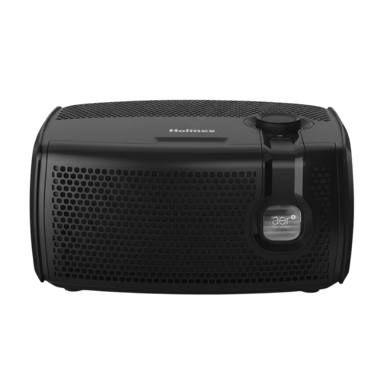

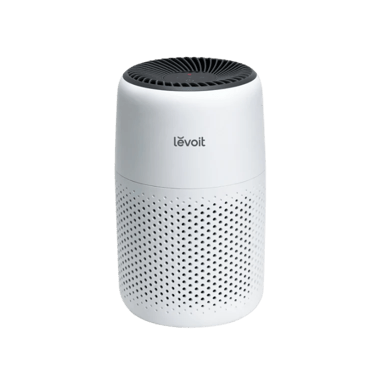
 Recaptor
 0
Cartling
0
Cartling